
Delicious Rewards Program
Frequently Asked Questions
General
What is Delicious Rewards?
Delicious Rewards is the Culver’s loyalty program that allows members to earn 10 points for every $1 spent at Culver’s restaurants and on the Culver’s website and app – and redeem those points for free menu items. It’s our way of thanking you for being a loyal fan.
Why should I join Delicious Rewards?
With Culver’s Delicious Rewards, you’ll be rewarded simply for enjoying Culver’s. Not only will you receive 10 points for every $1 you spend in a restaurant or online, we’ll also celebrate YOU with free treats on your birthday and half birthday along with more special offers and surprises throughout the year!
How do I sign up for Delicious Rewards?
Signing up for Delicious Rewards is easy! Visit www.culvers.com/delicious-rewards or scan a QR code at your local restaurant. Fill in your phone number or sign up with your Google or Apple account to start earning 10 points for every $1 you spend in Culver’s restaurants or on the Culver’s website and app. Add your ingredient preferences, dietary restrictions, favorite Flavors of the Day and Favorite restaurants for a truly customized Delicious Rewards experience. Add your birthday for special birthday and half-birthday treats.
How do I earn Delicious Rewards points?
For Delicious Rewards members, earning points is as simple as ordering your favorite menu items from Culver’s. After signing up for the program, be sure to check in by scanning your membership QR code at the counter or drive-thru window of any Culver’s restaurant or by signing in online or in the Culver’s app before completing your order. For every $1 you spend on Culver’s menu items, you’ll earn 10 Delicious Rewards points; rounded up to the nearest dime. For example $2.22 rounds up to $2.30 = 23 Delicious Rewards points or $4.95 rounds up to $5.00 = 50 Delicious Rewards points.
Please note that points are not awarded on purchases of Culver's Gift Cards (physical or digital), delivery orders, or items redeemed for $0 (i.e., Rewards).
How do I redeem Delicious Rewards points?
When you’ve earned 500 or more Delicious Rewards points, you may start redeeming your points for rewards. To turn your points into rewards, sign in to your account via the Culver’s website or app. In your Rewards section, you will see your current points balance, your current active rewards, and items available to redeem. When you select an item to redeem, tap the “redeem” button to add to your active rewards, or “send gift” to gift your reward to another Delicious Rewards member. You’ll have 14 days to use your active rewards, after which time they will revert back to points.
To use an active reward online/in the Culver’s app, tap on the active reward in your account center and tap “Apply Coupon.” Add the item to your order and continue ordering and checking out.
To use your active reward in a Culver’s restaurant, scan your membership QR code at the counter, proceed to order the item selected as your active reward (along with any other items you would like to order), and then tap “scan code” on the active reward in your app and scan the redemption QR code. Alternatively, you may tell the cashier your Reward Code.
To use your active reward in a Culver’s drive-thru, place your order at the menu board, including the item you would like to redeem, and drive to the window. When at the window, scan your membership QR code. Next, scan your redemption QR code. Alternatively, you may tell the team member your Reward Code.
You may only redeem one active reward per transaction.
What can I get for my Delicious Rewards points?
Points can be redeemed for rewards* such as free menu items shown in the Rewards section.
*Rewards are subject to change. See more Terms of Use.
When do my points expire?
Delicious Rewards points expire 365 days after they are earned.
When do my rewards expire?
Active rewards expire 14 days after they are acquired via point redemption. When active rewards expire, they revert back to points in your Delicious Rewards account.
Is there a limit to points earning?
The only limit to Delicious Rewards points earning is that you must claim the points for a past transaction within 30 days. Points may take up to 24 hours to be added to your account. Accounts will be flagged and the account holder notified if any potentially fraudulent transactions or abusive activity is observed.
As outlined in our Terms of Use, Culver’s does reserve the right to suspend a guest’s Delicious Rewards account if fraudulent or abusive activity is suspected.
Why can’t I earn points on gift cards?
We're sorry but purchases of Gift Cards are not eligible for points earning, as the points will be earned when the Gift Card is redeemed by a Delicious Rewards member. This is to avoid duplicate point issuing on a single gift card.
I forgot to scan/check in before paying. Can I still get points?
Points request for past purchases must be submitted through the Culver’s website and/or app using the Loyalty Summary code at the bottom of your payment receipt. After signing in, go to your History within the Account or Rewards sections, scroll to the bottom, and follow the “Forget to sign or check in? Click here to earn those points!" link.
Loyalty Summary code example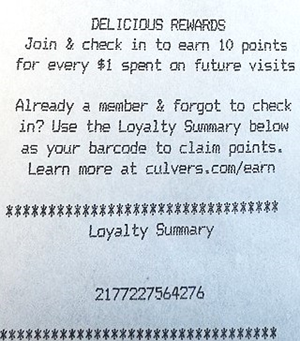
If you do not have a payment receipt from the cashier, there is unfortunately no way our systems can credit you points for missed check-ins. The order slip included with your food is not a receipt, and for security reasons, doesn’t contain sensitive info like payment details and the Loyalty Summary code required to apply points.
If your payment receipt is less than 30 days old, your transaction took place after you signed up for Delicious Rewards, and you're still experiencing issues, contact us at rewards@culvers.com with the subject line “Points Request”, your membership phone number and email address, and a photo or screenshot of the full payment receipt attached (clearly showing the following: location, date, sub-total, order ID at the top, and loyalty summary at the bottom).
We will do our best to process and fulfill your request within 14 business days of submission. We reserve the right to decline retroactive point requests. The only guaranteed way to earn points at the restaurant is by scanning your check-in QR code or providing your phone number to the cashier before paying.
Account Management
I want to change my email and/or phone number.
Unfortunately, we cannot update the email address or phone number on your Delicious Rewards account. If you’d like to create a new account, you may do so with your updated contact information. Please follow the instructions for deleting your account, then wait 48 hours to create a new account.
Contact us at rewards@culvers.com for assistance. Note: if you delete your account your accumulated points, rewards, and preferences will also be deleted.
If you need further assistance, please contact us at rewards@culvers.com.
Can I change my birthday?
We’re sorry, you cannot change your birthday in your Delicious Rewards account.
I can’t sign in to my account.
When signing in, be sure to input the most recent passcode sent via SMS or email to access your account. It may take up to a minute to send, so pay close attention to the timestamp on the message to ensure you’re using the most recent code. If you're still experiencing issues, please contact us at rewards@culvers.com and we’ll verify the email address and/or phone number associated with your account to get started.
I want to unsubscribe from Email, SMS, and/or Push Notification communications.
You can unsubscribe from Culver’s email communications by clicking the “unsubscribe” link in our emails or in your account on the Culver’s website or app. Visit “Communications” and toggle off Culver’s Marketing Emails and/or Favorite Local Restaurants. You can unsubscribe from Push notifications in the “Communications” section as well, or by going to the settings for your Culver’s app, notifications, and turning off notifications. You can unsubscribe from SMS by responding “STOP” to any Culver’s text message.
I need to change my favorite location(s), Flavors of the Day, and/or ingredient preferences.
You can update your favorite locations(s), Flavors of the Day, and ingredient preferences at Culvers.com/account or in the Culver’s app. Go to the “Favorites” section and select “Favorite Locations". From there you can add a location (by searching by zip or city and clicking the heart icon) or select an existing location to delete it, contact the restaurant, or see that restaurant’s Flavor of the Day calendar.
You also may subscribe or unsubscribe from that location’s emails in the “Communications” tab of your account.
Similarly, visit the “Favorites” section and click the heart icon to add or remove a favorite Flavor of the Day.
You may also toggle on/off your ingredient preferences in the “Favorites” section by clicking on the descriptors.
I want to delete my account.
To delete your Delicious Rewards account, sign in to your account at Culvers.com/account or in the Culver’s app. Tap “Personal Info” and then tap your name. There is a link on the bottom to “Delete Account.” Completing this step will remove you from our Delicious Rewards program, and delete any history, points, or rewards in the account. You will receive a confirmation message when your account has been deleted. This will take up to 48 hours.
Troubleshooting
I don’t have a receipt with the Loyalty Summary code on it.
If you do not have a payment receipt from the cashier, there is unfortunately no way our systems can credit you points for missed check-ins. The order slip included with your food is not a receipt, and for security reasons, doesn’t contain sensitive info like payment details and the “Loyalty Summary” code required to apply points.
My reward coupon didn’t work.
Any rewards are available to redeem online or in-restaurant for up to 14 days from when you add them to your account. If you don’t redeem within 14 days, those rewards will revert back to points, and those points will be added back to your account. Additionally, we’re only able to accept one reward coupon at a time (in restaurant or online) and our system may require a wait period between coupon redemptions from the same account.
Please redeem your points for rewards prior to placing your order. In the restaurant/at the drive-thru, simply scan your reward QR code prior to paying to apply your reward to your order. If ordering on the app/website, please ensure that a qualifying item is added to your order. Many Rewards do not allow substitutions, so just be sure that you’re adding the correct item and size for redemption.
If you’re still having issues redeeming a coupon, we’d be happy to look into it for you!
My points balance is wrong.
To view your points earning and rewards redemption history, visit your Rewards section at Culvers.com/Rewards or in the Culver’s app. There, you’ll be able to review your earning and redemption history.
You will earn 10 points for every $1 you spend at Culver’s. We’ll occasionally have special events/offers/boosts that allow you to earn more. Points expire 1 year (365 days) after earning. Additionally, if you do not use a redeemed reward within 14 days of redemption, the reward will be reverted to points, and those points will be transferred back into your account.
Why didn’t I get points for my order?
Our system does have some limitations when it comes to earning points. Points are not awarded on purchases of Culver's Gift Cards (physical or digital), delivery orders, or items redeemed for $0 (i.e., Rewards).
Additionally, we reserve the right to limit points earning events to 3 orders in a single day (24 hours) and tickets of $100 or more. If you feel that your points earning was limited unnecessarily, we’d be happy to look into it for you.
Please note that the only way to guarantee points earning for qualifying purchases is to scan your check-in QR code, provide your phone number to a team member, or sign in prior to placing your order.
I didn’t get my birthday (or half birthday) email.
Your birthday treat (a free single Create Your Own Dish with two toppings) should automatically be applied to your Delicious Rewards account on the 1st day of your birthday month and on the first day of your half-birthday month. Check your Rewards Account to see if your gift has been applied. Your gift is valid for the entire month that your birthday lands in.
If your gift was not applied, we’d be happy to look into it for you!
I didn’t get my welcome coupon.
Your 25% Welcome offer should appear in your Delicious Rewards account within an hour of signing up. Check your Rewards Account to see if your offer has been applied. The Welcome Offer is valid up to 2 weeks after issuance.